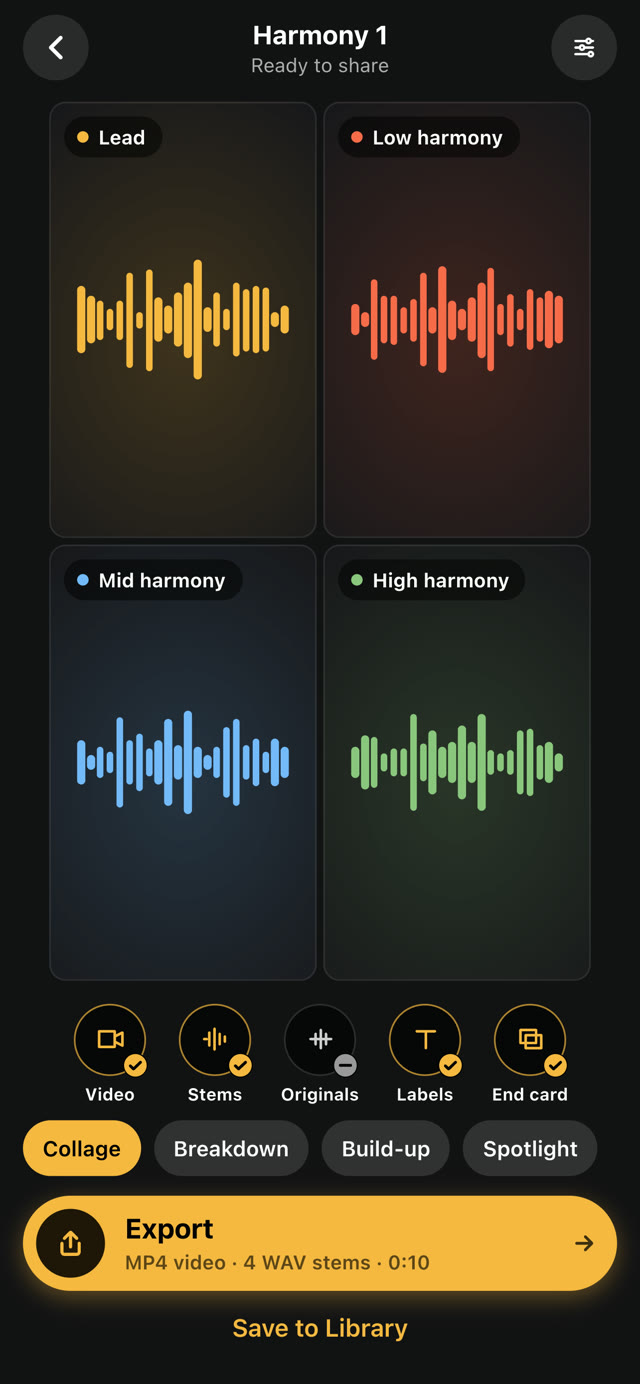
Export your harmony video and stems
Pick a video style, then export one MP4 with every part in its tile, plus WAV stems for your producer.
How to
- Tap Next when your parts are ready. Your harmony plays back as a video.
- Choose a style. Collage shows every part together. Build-up adds one part per pass. Breakdown also adds one part per pass, and draws each voice's notes. Spotlight shows one part at a time, full screen.
- Turn on what you want: Video, Stems, Originals, Labels (each part's name) and End card.
- Tap Export, then save or share the files.
- Or tap Save to Library to keep it in Harmony.
Good to know
- Free accounts export Collage videos in 1080p. Member adds every style and WAV stems.
- Stems are lined up with each other, so your producer can drop them straight into a session. All FX on the whole mix isn't added to them.
- Originals adds each part's audio at the speed and pitch you recorded it.
Something not working? Email us.